
Sharing within PT Direct
PT Direct offers two ways to share content with practitioners in your organisation. This article explains both methods so you can choose the one that fits your setup.
|
|
Master account | Practitioner sharing |
| What is shared? | Content only (exercises, programmes, outcome measures) | Content and/or patients |
| Direction | One account → all selected practitioners | All selected practitioners ↔ each other |
| Best for | Standardising content across your organisation | Collaborative care between practitioners |
1. Sharing content from a "master" account in PT Direct
With the master account feature, you designate one Physitrack account as the central source of content for your organisation. Any exercises, pre-set programmes, and outcome measures created inside that account are automatically shared with the practitioners you select.
Important notes before you start:
- The master account must be registered as a practitioner account inside your PT Direct licence.
- This method shares content only; it does not include patient sharing.
- Content shared from the master account is not syndicated to PT Direct sub-accounts.
- We recommend using a dedicated content-only account as the master account, as other practitioners cannot share patients with it.
How to set up the master account:
- Open the "Master account" menu in the left side panel.
-
Enter the email address associated with your "master" account, and click "Save".

- Select the tick box beside those accounts within your Physitrack Direct ecosystem that you would like to have access to all of the exercises, programs, and questionnaires in the master account.
- These will then be shown in your colleague's account with your initials beside the title.
-

Remember, you can copy a patient's program to your Library > Programs tab. Simply open up your client's file from the Client menu, go to "View program" and select the Copy to library button in the top right corner. If this is in the Master account, this program will automatically be shared with your colleagues selected above in step 3.

2. Practitioner sharing
With Practitioner sharing, you select a group of practitioners who can access each other's content and/or patients within your PT Direct account. Unlike the master account method, sharing here is mutual; all practitioners in the group can see each other's work.
Important notes before you start:
- Remember to update these settings whenever you add new practitioners to PT Direct, as new users are not added to share groups automatically.
- If a practitioner who is sharing their patients with peers is removed from PT Direct, those patients will no longer be accessible to the other practitioners in the group.
- To avoid duplicate patients, all practitioners who can access each other's patients in your practice management system (PMS) should also be set up to share patients in Physitrack.
How to set up Practitioner sharing:
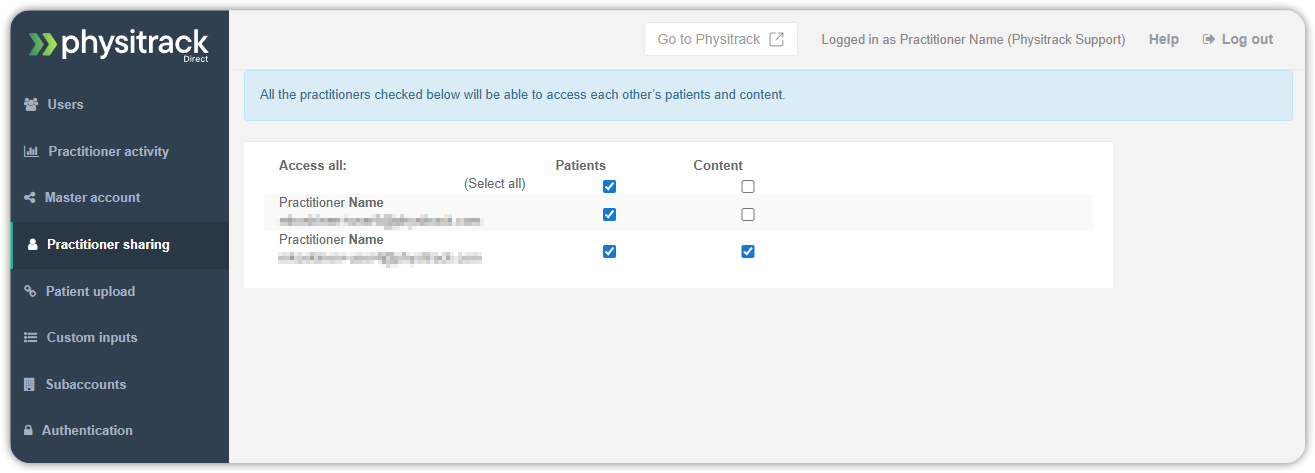
- Go to Practitioner sharing
-
Select the practitioners who should be included in the global share group. All checked practitioners will be able to access the clients and/or content of all the other checked practitioners, and vice versa.
Which method should I use?
Use the master account if your organisation has a standardised set of exercises, programmes, or outcome measures that all practitioners should have access to, and you want a single person or team to manage that content centrally.
Use practitioner sharing if your practitioners work collaboratively and need access to each other's patients and/or content, for example, in a multi-disciplinary team or a clinic where patients are seen by more than one practitioner.