
How to change my PhysiAssistant Pin code
If you wish to change your PIN code, either to set a new one or reset it because you have forgotten your previous one, this can easily be done.
Change your PIN code from the app
- Log in to PhysiAssistant with your Physitrack account information.
-
Select the cog wheel in the upper right corner

-
Select "Change PIN code"
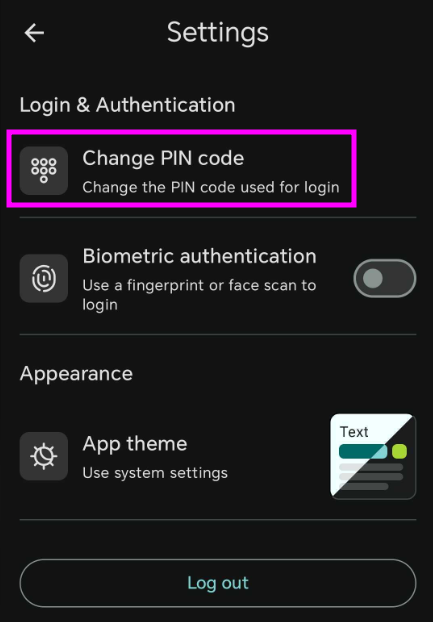
- It will request that you input your old PIN code before entering the new one
- After inputting your old pin, selecting a new one, and confirming it, the changes will be saved
How to reset the PIN code if I forgot it
- To reset your PIN code without access to PhysiAssistant, you must first uninstall the app and reset your Physitrack account password following this guide: Reset your Physitrack password
- Once you have reset the password, reinstall PhysiAssistant on your phone and log in
-
Once you have logged in, you will be prompted to set a new PIN code and confirm it.


Important
-There is currently no other way to reset the PIN code if you have forgotten it and can't access PhysiAssistant other than by resetting your password.
-You can bypass using your PIN code or have a backup in case you forget it by enabling Biometric Authentication. Check here on how to do it: How to enable Biometric Authentication PhysiAssistant